From tons of feedback that we received from users’ interviews and surveys, we found out the following top 5 dilemmas our users had while signing up for meetups on the app:
- Make the more simple payment process
- Check all the information about each meetup at once
- Able to see who will participate in meetups
- Contact directly to meetup host
- Mark the meet-up location with a map
With our product team, we tried to look into the user journey for the meetup and payment section. First, it wasn’t easy to check all the information at once on a page as users wanted.
Then secondly, the payment system was complicated. It made users go through several steps to finish their payment using another external page. These issues created confusion in the process of using the NomadHer app. For building more user engagement and a better user journey, our team developed these features in Dec.
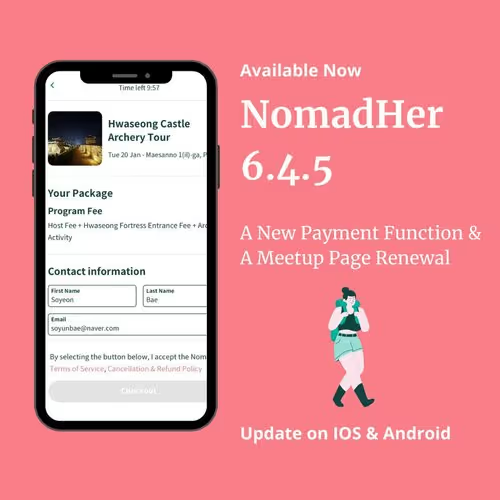
We’re excited to announce the launch of a big important feature: A New Payment Function and A Meetup Page Renewal [6.4.5]! 🎉


A simple payment process to make it easier to sign up for meetups
It would be good to pay within the app instead of asking to go to other links and check detailed information and payment.
-- C. Rebecca(NomadHer user)
A lot of NomadHers had the same difficulties. Now, in the Meetups section of the app, If you click the meetup program that you want to participate in, you will see all the information arranged organized way by the tab bar above.
And then if you click the Register for Meetup button on the bottom, the only process left to finish your participation is to put in your payment information and that’s it! In this way, you can finish quickly and look around at other meetups that you are interested in.


So how about wandering around on the Meetup page to check and participate in upcoming events?
Let’s click your favorite meetup first!
- You can look through all the information at once that you want to see on one page. Click the tab bar (Host/About/Schedule/Packages/FAQ/Comments) to find the specific information that you want.
- Click the Register for Meetup button if you want to join the meetup
- Choose the package and put your payment information to check out, and it is done!
After you’ve done payment, you will get the confirmation mail and your profile will be shown on the “NomadHers Going” part on the upper part of the meetup.
Get on the NomadHer app now and join our upcoming meetups to meet female travelers over the word!
In the end, the NomadHer team really appreciates all the valuable suggestions and feedback from our users. (There are some example suggestions shown below.) We would like constantly hear from you more. (Please click here to give us feedback.)
I'd like the post more photos and videos to share my travel story together.
-- K. Sophie
Maybe it would be great to be able to have travel postings grouped by location.
-- C. Young